Take the business rule out of your agent's prompt
A credit, discount, or eligibility policy can live as code in GitHub and run inside the flow as a Function. You can then change and test the rule separately, and later reconstruct which version was in effect.
Risk raises the microcredit limit from 150 to 200 dollars. The rule that applies that limit sits inside your agent's prompt, between the instructions for greeting someone, asking for their ID, and explaining a rejection.
Months later, someone asks about a specific application: which policy was in effect when it was evaluated, who last changed it, and what was tested before release. Answering means reconstructing the rule as it stood on that date. If the policy and the conversation instructions are one piece of text, every edit shares the same timeline, and whoever reads the history has to decide whether each change affected wording or policy.
Which rules should live separately
Versioning the entire prompt does not separate the rule's history from the conversation instructions. They still share a file, an author, and a commit, even when that file lives in a repository.
Not every instruction needs to move. Ask whether the result must be verifiable and whether a change to the rule may need to be reviewed or reconstructed later. A maximum amount, an eligibility criterion, or a discount percentage meets both conditions. An instruction about how to greet someone or ask for a detail can stay in the prompt.
If you need to verify the result or reconstruct the change, write the rule as explicit logic. You can then test and deploy it separately, while its history remains available as a change of its own.
Where the rule lives and how it runs
In a repository, the policy follows the same path as any other software change: you can see what changed, who changed it, and keep its history. Each organization decides who reviews it and how business approval is recorded. The rule is available for review separately from the prompt.
Jelou Functions runs that file inside the flow. A Function is TypeScript code that you deploy and the agent invokes as a tool. It receives the data the flow already retrieved, applies the policy, and returns a structured decision. In this pattern, the Function does not query anything on its own, so you can run it against data you provide.
It does not invent the rule. It applies the policy your company already set. In this example, the entire policy is three constants:
const MAX_AMOUNT = 150;
const MIN_MONTHS = 3;
const MAX_MORA = 15;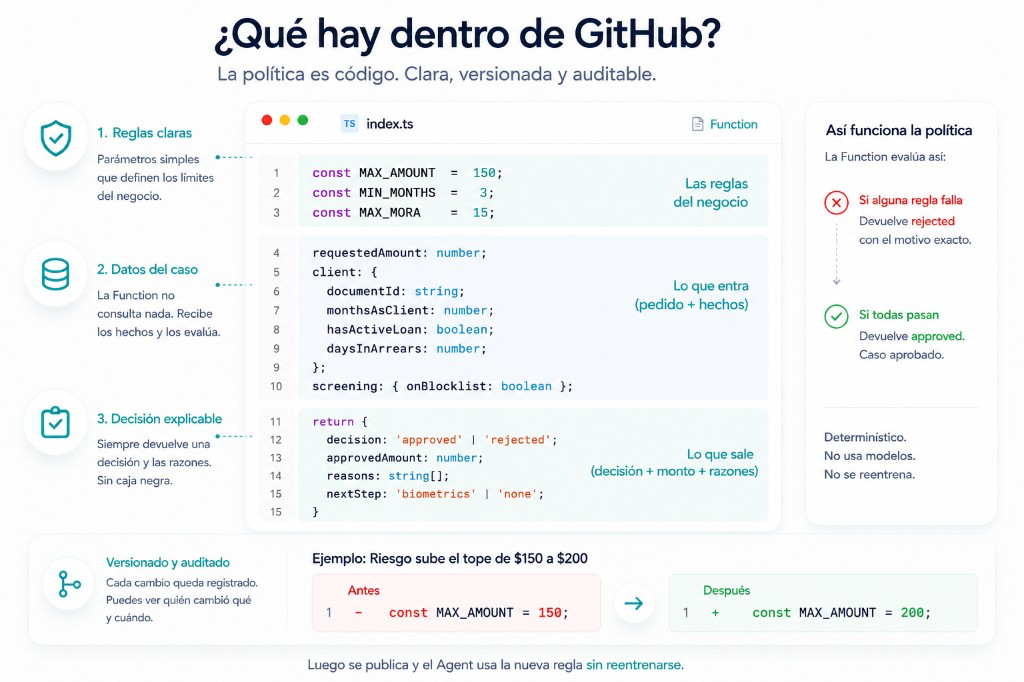
The response includes the decision and the reasons behind it. The agent uses those reasons to explain the outcome, while the person on WhatsApp sees one continuous conversation.
What happens when Risk raises the limit
Risk raises the limit to 200, and that is a one-line change in a file.
The diff shows exactly what changed. The tests run against known cases, using data that does not come from production. Deployment is not automatic either: the example workflow has no push trigger. Someone runs it from the Actions tab by selecting Run workflow.
The same request for 180 dollars is rejected while the limit is 150:
{
  "decision": "rejected",
  "approvedAmount": 0,
  "reasons": ["The amount exceeds the $150 limit"],
  "nextStep": "none"
}
With the limit at 200, it returns an approval:
{
  "decision": "approved",
  "approvedAmount": 180,
  "reasons": ["Meets the current policy"],
  "nextStep": "biometrics"
}
You did not touch the prompt. To answer the original question, you can follow three records: the commit shows what changed and who changed it; the deployment history shows when it reached production; and, if it went through a pull request, the review is recorded there.
When to leave it in the prompt
Separating a rule has a cost: you define inputs and outputs, write tests, deploy code, and maintain it. That cost is not justified for an instruction that shapes the tone of a response. It belongs in the prompt.
Open one of your agent prompts and find the phrases that make a decision: an amount, a limit, an eligibility criterion. For each one, ask whether someone may need to verify why that result was returned or review the change that altered it. Those are good candidates for separate logic.
Support
Still stuck?
Open it from your account.
How to write to us